The Media area is the community's shared feed: images, videos, sounds and pages by members appear here — gallery images, for example, or proof from public tasks.
Note: The screenshots show the German interface — the layout is identical in every language.
Opening the media feed
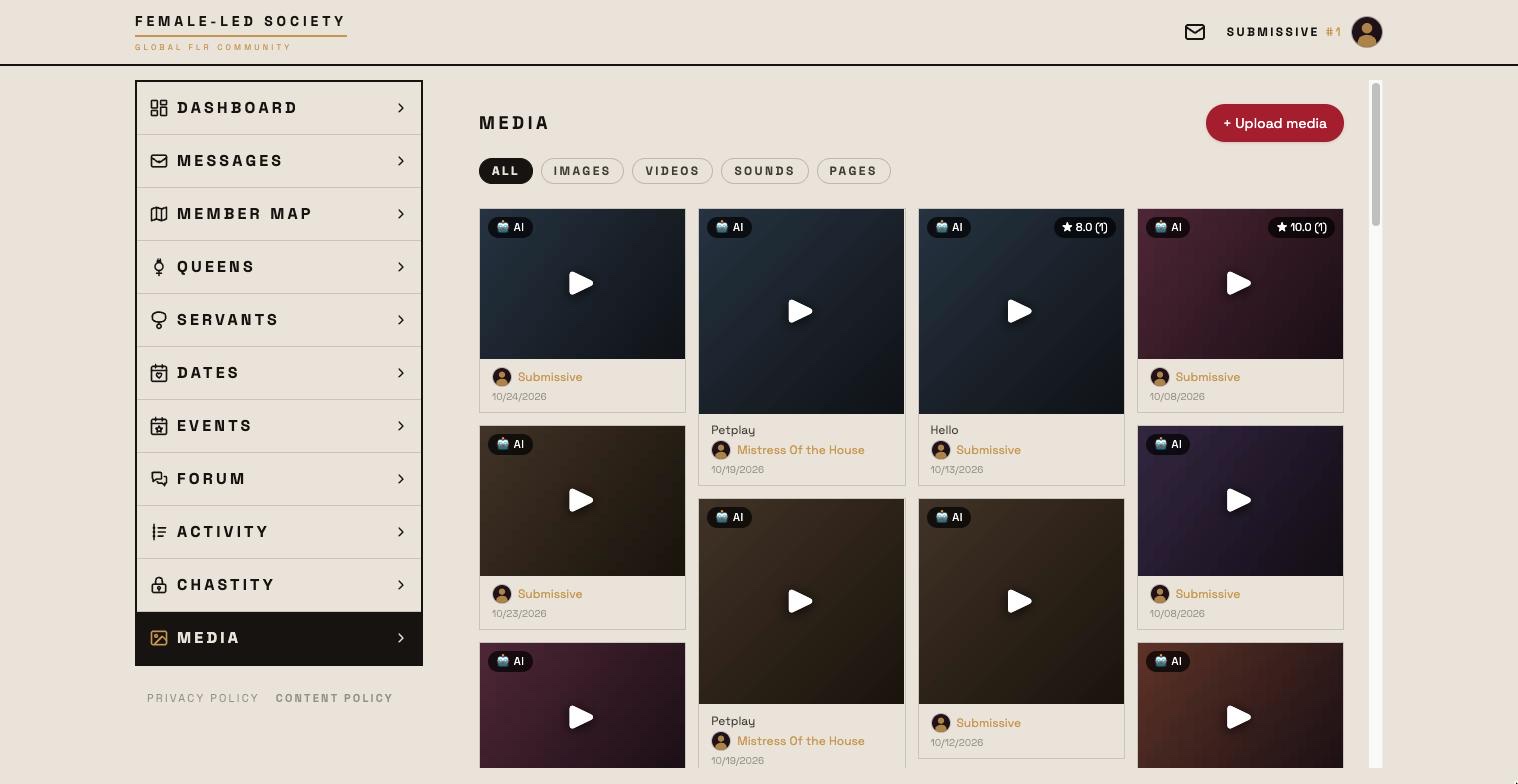
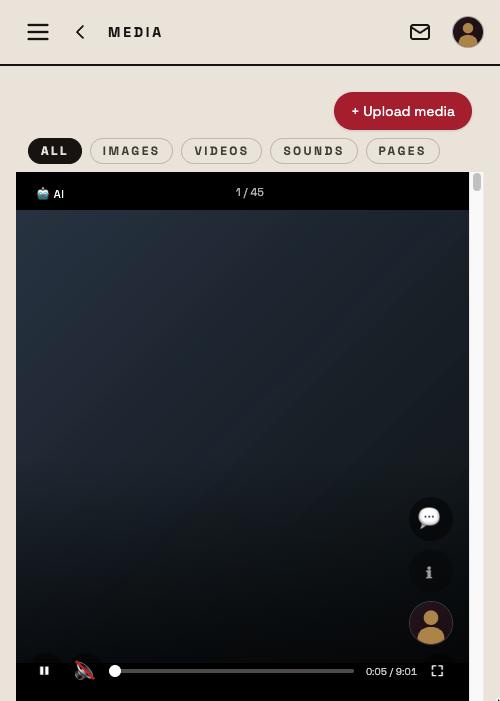
- Open Media in the left menu.
- The feed shows the latest contributions from all members as tiles — media and pages mixed, strictly by date, newest first. The top right of a tile shows the rating (average and count), the bottom right the number of comments.
- Clicking an image or video opens the full-screen view; the arrows page through the feed, and videos start on their own there. Paging only happens by hand — a video that has finished stays put. Sounds play right in the tile. The creator's profile is reached via their profile picture.
- Clicking a page tile opens the page.
- Show more at the bottom loads further entries.
On phones and tablets: the swipe view
On touch devices the feed is a swipe view like TikTok: one entry per screen, swipe up for the next; further entries load on their own. Videos start by themselves, muted at first.
At the bottom of every slide sits the control bar: on the left ⏸/▶ for autoplay and, for videos, the sound, in the middle the timeline for scrubbing with your finger, on the right ⛶ fullscreen. Autoplay is on to begin with: images and pages move on after a few seconds, videos and sounds when they end. ⏸ stops everything — including the running video — and a tap on the video does the same; new slides then do not start on their own until you press ▶ again.
On the right above the control bar, stacked, are 💬 (comments), ★ (rate — queens only; below it the average and count for everyone), ℹ and the uploader's profile picture. Title, album, description and date fade out after a short while so they do not cover the picture; ℹ brings them back and keeps them. In fullscreen the right column disappears entirely.
Filtering by media type
The tabs at the top filter the feed:
- All — the complete feed.
- Images — photos only.
- Videos — videos only.
- Sounds — audio recordings only.
- Pages — the written pages of members (see Setting up your profile).
The AI label
If a tile carries the AI marker at the top left, the creator has marked the medium as created entirely or mostly by an AI.
Rating
Queens rate media by servants with 0 to 5 stars (tap or drag across the stars; tapping the last filled star removes it) — in the feed via the stars in the footer of the full-screen view, in the swipe view via ★, in the servant's profile gallery in the opened image. Each queen rates a medium once; a later rating replaces the earlier one. Everyone else only sees the result: average and count on the tile, plus the individual values per queen in the full-screen and swipe views.
Commenting
You can comment on any medium you are allowed to see — up to 1000 characters, text only. The 💬 button sits in the full-screen view, in the swipe view and in the profile gallery; it unfolds the list. Comments by queens come first, the rest below, newest first in each group. The author, the owner of the medium and admins may delete. There is no notification for comments; between members who have blocked each other the medium and its comments are not reachable.
What does not show up here
Two independent locks keep media out of the feed — both have to be open:
- Protected media. Anything a member marked Approval required never appears in the feed. You only meet such media in the gallery on a profile, covered up and with a Request access button.
- Unreviewed media. Fresh uploads go through a short review first. Until an administrator approves them, only the creator can see them.
Also not in the feed: images and audio recordings that sit inside a page. They belong to their page and appear with it.
Requesting protected media
If you come across a covered-up medium in a profile gallery:
- Click Request access — the state changes to Requested.
- The request appears on the creator's dashboard under Media access requests, where they confirm or decline it.
- After approval the medium is visible to you. If declined it says Declined.
The other way round you can share without waiting for a request: in the chat via 🔑 Permissions, per contact and per medium (see Messages).
Uploading yourself
+ Upload media at the top of the feed uploads images, videos and audio — the same way as in the gallery of your profile. Before each file a dialog asks for title and description (both optional), Approval required, the AI-generated medium label, the album and — for servants — the position; images get a square crop for the tile there. HEIC photos from an iPhone are converted to JPEG automatically when selected.
The medium appears in the feed only once moderation has approved it — with approval required not at all, it then stays in the profile. That is why the feed shows a notice after uploading with the link To the profile gallery, where you see it right away. 25 entries are possible in total — pages, images, videos and audio together.
Your own media
You manage your own images, videos, audio and pages in the Media tab of your profile (see Setting up your profile). That is also where you decide afterwards what requires approval and sort things into albums — keeping control over who sees what.